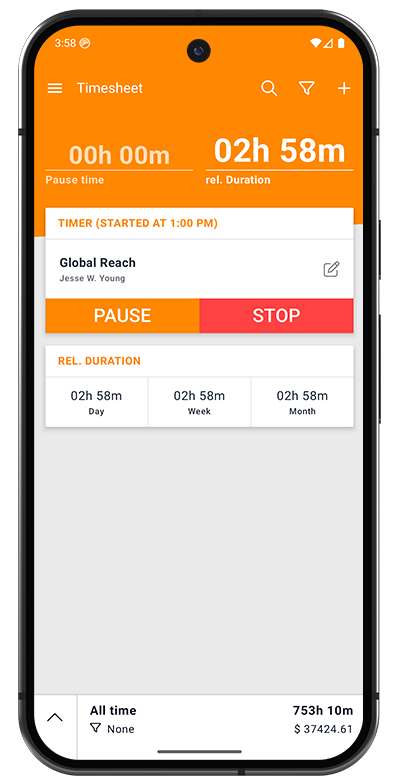
Android App
The Timesheet Android app is your complete time tracking solution that works everywhere - online, offline, at the office, or on the go. Built natively with Kotlin and modern Android best practices, it delivers professional-grade time tracking with the reliability and performance Android users expect.
Highlights
- Offline-first - All data stored locally, works without internet
- Smart automation - Geofence, Wi-Fi, and NFC triggers start/stop tracking automatically
- Cloud sync - Syncs across devices when connected (Plus/Pro plans)
Key Features
Time Tracking & Timer
One-Tap Time Tracking
- Start/stop/pause controls with a single tap
- Persistent notification shows elapsed time even with screen off
- Timer survives device restarts
- Background operation with minimal battery impact
Flexible Time Entry
- Real-time tracking for active work
- Manual task creation for past entries
- Adjust start/end times after the fact
- Multiple task types: Standard, Mileage, Call logging
Duration Tracking
- Total Duration (including breaks)
- Relative Duration (work time only)
- Configurable display formats (HH:MM:SS, HH:MM, or decimal hours)
- Automatic rounding options (5, 10, 15, 30, 60 minutes)
Project & Task Management
Unlimited Organization
- Create unlimited projects for clients, employers, or activities
- Assign custom hourly rates per project
- Archive completed projects to reduce clutter
- Search and filter projects instantly
Rich Task Details
- Task descriptions and notes
- Tags for cross-project categorization
- Custom rates with Factor and Extra/h calculations
- Billable/Billed/Paid status tracking
- Location information (informational)
Breaks & Expenses
- Manual and automatic break tracking
- Expense logging with amounts and descriptions
- Notes and attachments for context
- Separate break time from billable hours
Intelligent Automation (All Plans)
Geofence Automation
- Location-based triggers start/stop timer automatically
- Set radius from 50m to 1000m
- Multiple geofences per project
- Background monitoring with "Allow all the time" permission
- Available in Basic, Plus, and Pro plans
Wi-Fi (WLAN) Automation
- Trigger timer based on network connection
- Perfect for office or home office tracking
- Connect = Start, Disconnect = Stop
- Works with saved Wi-Fi networks
- Available in all plans
NFC Tag Support
- Tap phone to NFC tags for instant control
- Write automation settings to reusable tags
- Ideal for physical job sites or workstations
- Immediate response, no GPS required
- Available in all plans
Statistics & Insights
Visual Analytics
- Progress charts showing work patterns over time
- Daily working hours averages by day of week
- Project distribution pie/donut charts
- Tag-based time allocation
- Cumulative hours trend lines
Financial Tracking
- Total earnings across projects
- Billable vs. non-billable hours
- Project-by-project revenue
- Rate impact analysis
Export Charts
- Save charts as high-resolution PNG images
- Share via email or cloud storage
- Include in client reports
Data Management
Automatic Backups (All Plans)
- Basic plan: Automatic local backups on device
- Plus/Pro plans: Automatic cloud backups + local backups
- Never lose your time tracking data
- Restore after app reinstall or device change
Cloud Synchronization (Plus/Pro)
- Real-time sync across all your mobile devices
- Changes appear instantly everywhere
- Automatic conflict resolution
- Multi-device support (phone, tablet)
- Secure, encrypted transmission
Data Export
- Export to Excel (XLSX, XLS) or CSV
- Customizable export fields
- Filter by date range, project, or status
- Perfect for client invoices or accounting
Mobile-Specific Features
Home Screen Widget
- Quick access widget for instant timer control
- View current task without opening app
- Multiple widget sizes available
- Customizable appearance
Notifications
- Persistent notification with running timer
- Quick action buttons (pause/stop)
- Timer duration always visible
- Customizable notification settings
Wear OS Support
- Companion app for Android smartwatches
- Start/stop timer from your wrist
- View current task and duration
- Quick project selection
Battery Optimization
- Efficient background operation
- Minimal battery drain during tracking
- Smart sync to preserve battery
- Configurable sync frequency
Platform Requirements
Minimum Requirements
- Android Version: 6.0 (API 23) or higher
- Recommended: Android 9.0 (API 28) or higher for best experience
- Storage: 50 MB free space
- RAM: 1 GB minimum, 2 GB recommended
Optional Permissions
For Full Functionality:
- Location: Required for geofence automation (optional feature)
- Notifications: For timer notifications and reminders
- Storage: For export files and backups
- NFC: For NFC tag automation (optional feature)
- Call logs: For automatic call tracking (optional feature)
Privacy Note: All permissions are optional except storage. The app works fully without granting location, NFC, or call log permissions - you simply won't be able to use those specific features.
Device Compatibility
Supported Devices:
- Smartphones running Android 6.0+
- Tablets (optimized layouts for large screens)
- Chromebooks with Google Play Store
- Android TV (limited functionality)
- Wear OS smartwatches (companion app)
Optimized For:
- Samsung Galaxy devices
- Google Pixel devices
- OnePlus, Xiaomi, Huawei devices
- Most standard Android devices
Getting Started
Quick Start Guide
1. Download the App
Download from Google Play Store on your Android device.
2. First Launch
- Open the app after installation
- Choose to create an account (for cloud sync) or use locally
- Grant necessary permissions when prompted
- Follow the Getting Started guide for detailed setup
3. Create Your First Project
- Tap the Projects tab
- Tap + to create a new project
- Enter project name and hourly rate
- Save the project
4. Start Tracking Time
- Tap the Timer tab
- Select your project from the dropdown
- Tap START to begin tracking
- Tap STOP when finished
- Review and save your task
5. Explore Features
- Set up automation for hands-free tracking
- Configure settings to match your workflow
- Review statistics to understand your work patterns
- Export data for invoicing or reporting
Complete Documentation
Core Features
- Getting Started - Initial setup and account creation
- Timer - Using the time tracking interface
- Projects - Creating and managing projects
- Tasks - Task creation and organization
Advanced Features
- Breaks, Expenses & Notes - Detailed task information
- Tags & Custom Rates - Advanced organization and billing
- Automation - Geofence, Wi-Fi, and NFC triggers
- Statistics - Analytics and insights
Tools & Configuration
- Export - Generating reports for clients
- Widget - Home screen widget setup
- Settings - Customizing the app
Support
- FAQ - Frequently asked questions
- Troubleshooting - Solving common issues
Privacy & Security
Your Data, Your Control
- All data stored locally on your device first
- Optional cloud sync (you control when and what syncs)
- No third-party data sharing
- GDPR-compliant data handling
- Delete account and all data anytime
Security Features
- Firebase authentication with JWT tokens
- SSL/TLS encrypted connections (cloud sync)
- Secure local database encryption option
- No vendor lock-in - export all data anytime
Location Privacy
- Location tracking is completely optional
- Only used if you enable geofence automation
- Location data never shared with third parties
- You control location permissions
Technical Support
Need Help?
- Email: support@timesheet.io
- Response time: Within 24 hours (business days)
- Check FAQ and Troubleshooting first
- Pro plan users get priority support
Download
See Plans & Pricing for available features.