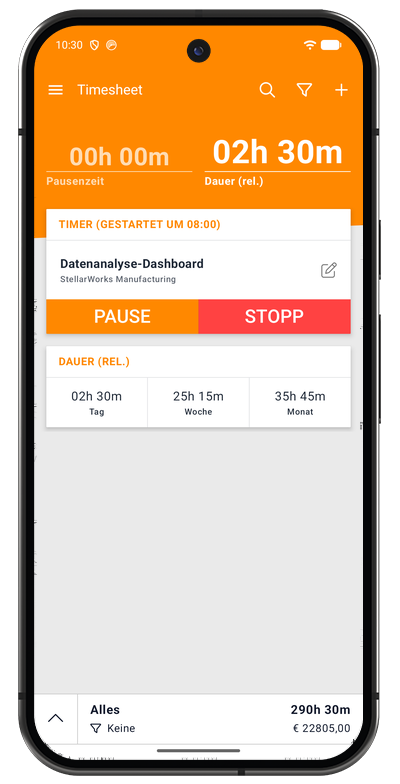
Android App
The Timesheet Android app is your complete time tracking solution that works everywhere - online, offline, at the office, or on the go. Built natively with Kotlin and modern Android best practices, it delivers professional-grade time tracking with the reliability and performance Android users expect.
Why Choose the Android App?
Built for Real-World Use The Android app is designed for professionals who can't always rely on internet connectivity. Whether you're a field technician, remote consultant, or freelancer working from coffee shops, the app ensures every minute of your work time is captured accurately.
Truly Offline-First Unlike web-based solutions that require constant connectivity, the Android app stores all your data locally on your device. Track time, create projects, log expenses, and manage tasks with zero internet dependency. When you reconnect, everything syncs seamlessly to the cloud (Plus/Pro plans).
Powerful Automation Set up geofence triggers that automatically start your timer when you arrive at a job site, Wi-Fi automation for office environments, or NFC tags for instant timer control with a simple phone tap. These automation features work in the background, so you never forget to start or stop tracking time.
Native Android Experience Built with Jetpack Compose and following Material Design guidelines, the app feels right at home on your Android device. Fast, fluid animations, intuitive gestures, and deep Android integration make time tracking effortless.
Key Features
Time Tracking & Timer
One-Tap Time Tracking
- Start/stop/pause controls with a single tap
- Persistent notification shows elapsed time even with screen off
- Timer survives device restarts
- Background operation with minimal battery impact
Flexible Time Entry
- Real-time tracking for active work
- Manual task creation for past entries
- Adjust start/end times after the fact
- Multiple task types: Standard, Mileage, Call logging
Duration Tracking
- Total Duration (including breaks)
- Relative Duration (work time only)
- Configurable display formats (HH:MM:SS, HH:MM, or decimal hours)
- Automatic rounding options (5, 10, 15, 30, 60 minutes)
Project & Task Management
Unlimited Organization
- Create unlimited projects for clients, employers, or activities
- Assign custom hourly rates per project
- Archive completed projects to reduce clutter
- Search and filter projects instantly
Rich Task Details
- Task descriptions and notes
- Tags for cross-project categorization
- Custom rates with Factor and Extra/h calculations
- Billable/Billed/Paid status tracking
- Location information (informational)
Breaks & Expenses
- Manual and automatic break tracking
- Expense logging with amounts and descriptions
- Notes and attachments for context
- Separate break time from billable hours
Intelligent Automation (All Plans)
Geofence Automation
- Location-based triggers start/stop timer automatically
- Set radius from 50m to 1000m
- Multiple geofences per project
- Background monitoring with "Allow all the time" permission
- Available in Basic, Plus, and Pro plans
Wi-Fi (WLAN) Automation
- Trigger timer based on network connection
- Perfect for office or home office tracking
- Connect = Start, Disconnect = Stop
- Works with saved Wi-Fi networks
- Available in all plans
NFC Tag Support
- Tap phone to NFC tags for instant control
- Write automation settings to reusable tags
- Ideal for physical job sites or workstations
- Immediate response, no GPS required
- Available in all plans
Statistics & Insights
Visual Analytics
- Progress charts showing work patterns over time
- Daily working hours averages by day of week
- Project distribution pie/donut charts
- Tag-based time allocation
- Cumulative hours trend lines
Financial Tracking
- Total earnings across projects
- Billable vs. non-billable hours
- Project-by-project revenue
- Rate impact analysis
Export Charts
- Save charts as high-resolution PNG images
- Share via email or cloud storage
- Include in client reports
Data Management
Automatic Backups (All Plans)
- Basic plan: Automatic local backups on device
- Plus/Pro plans: Automatic cloud backups + local backups
- Never lose your time tracking data
- Restore after app reinstall or device change
Cloud Synchronization (Plus/Pro)
- Real-time sync across all your mobile devices
- Changes appear instantly everywhere
- Automatic conflict resolution
- Multi-device support (phone, tablet)
- Secure, encrypted transmission
Data Export
- Export to Excel (XLSX, XLS) or CSV
- Customizable export fields
- Filter by date range, project, or status
- Perfect for client invoices or accounting
Mobile-Specific Features
Home Screen Widget
- Quick access widget for instant timer control
- View current task without opening app
- Multiple widget sizes available
- Customizable appearance
Notifications
- Persistent notification with running timer
- Quick action buttons (pause/stop)
- Timer duration always visible
- Customizable notification settings
Wear OS Support
- Companion app for Android smartwatches
- Start/stop timer from your wrist
- View current task and duration
- Quick project selection
Battery Optimization
- Efficient background operation
- Minimal battery drain during tracking
- Smart sync to preserve battery
- Configurable sync frequency
What Makes It Special?
Offline-First Architecture
The Android app is built with offline functionality as the primary design principle:
- Local-First Storage: All data stored in Room database on your device
- Queue-Based Sync: Changes queue locally and sync when connected (Plus/Pro)
- No Connectivity Required: Full feature access without internet
- Instant Response: No waiting for server requests
- Zero Data Loss: Nothing depends on network reliability
Modern Android Technology
Built With:
- Kotlin: Modern, concise, safe programming language
- Jetpack Compose: Declarative UI toolkit for native Android
- Room Database: Robust local data persistence
- WorkManager: Reliable background task scheduling
- Hilt: Dependency injection for clean architecture
- Coroutines & Flow: Efficient async operations
Follows Best Practices:
- Material Design 3 guidelines
- Android Architecture Components
- MVVM architecture pattern
- Repository pattern for data access
- Clean separation of concerns
Platform Integration
Deep Android Integration:
- Location Services for geofencing
- Wi-Fi state monitoring
- NFC tag reading/writing
- Background location tracking
- Notification channels
- Share functionality
- File provider for exports
System Features:
- Adaptive icons
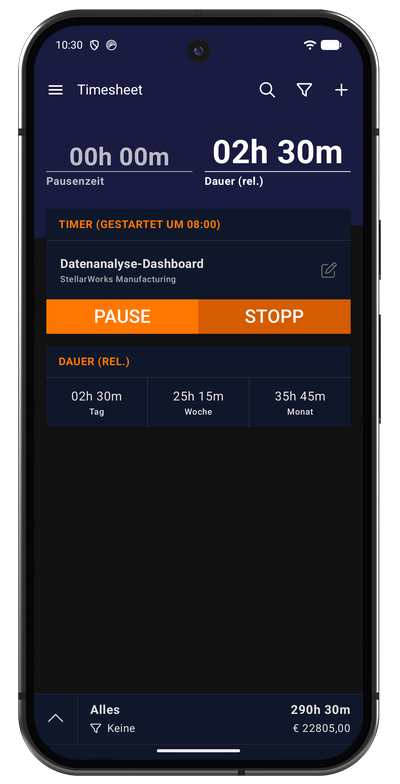
- Dark theme support
- Split screen/multi-window
- Picture-in-picture support
- Accessibility features
- Multiple language support (40+ languages)
Platform Requirements
Minimum Requirements
- Android Version: 6.0 (API 23) or higher
- Recommended: Android 9.0 (API 28) or higher for best experience
- Storage: 50 MB free space
- RAM: 1 GB minimum, 2 GB recommended
Optional Permissions
For Full Functionality:
- Location: Required for geofence automation (optional feature)
- Notifications: For timer notifications and reminders
- Storage: For export files and backups
- NFC: For NFC tag automation (optional feature)
- Call logs: For automatic call tracking (optional feature)
Privacy Note: All permissions are optional except storage. The app works fully without granting location, NFC, or call log permissions - you simply won't be able to use those specific features.
Device Compatibility
Supported Devices:
- Smartphones running Android 6.0+
- Tablets (optimized layouts for large screens)
- Chromebooks with Google Play Store
- Android TV (limited functionality)
- Wear OS smartwatches (companion app)
Optimized For:
- Samsung Galaxy devices
- Google Pixel devices
- OnePlus, Xiaomi, Huawei devices
- Most standard Android devices
Plans & Pricing
The Android app is available with all Timesheet plans:
Basic (Free) Includes:
- ✅ Full Android app access
- ✅ Unlimited time tracking
- ✅ Unlimited projects and tasks
- ✅ Automation features (geofence, Wi-Fi, NFC)
- ✅ Automatic local backups
- ✅ Offline functionality
- ✅ Export to Excel/CSV
- ❌ No cloud sync (local only)
Plus Adds:
- ✅ Cloud synchronization across mobile devices
- ✅ Automatic cloud backups
- ✅ Multi-device mobile support (phone + tablet)
- ✅ Real-time sync
Pro Adds:
- ✅ Web app access at my.timesheet.io
- ✅ Team collaboration features
- ✅ PDF invoice generation
- ✅ Business integrations (QuickBooks, Zapier)
- ✅ API access
All plans include the complete Android app - upgrade only adds cloud sync and collaboration features.
See Plans & Pricing for full comparison.
Getting Started
Quick Start Guide
1. Download the App
Download from Google Play Store on your Android device.
2. First Launch
- Open the app after installation
- Choose to create an account (for cloud sync) or use locally
- Grant necessary permissions when prompted
- Follow the Getting Started guide for detailed setup
3. Create Your First Project
- Tap the Projects tab
- Tap + to create a new project
- Enter project name and hourly rate
- Save the project
4. Start Tracking Time
- Tap the Timer tab
- Select your project from the dropdown
- Tap START to begin tracking
- Tap STOP when finished
- Review and save your task
5. Explore Features
- Set up automation for hands-free tracking
- Configure settings to match your workflow
- Review statistics to understand your work patterns
- Export data for invoicing or reporting
Complete Documentation
Core Features
- Getting Started - Initial setup and account creation
- Timer - Using the time tracking interface
- Projects - Creating and managing projects
- Tasks - Task creation and organization
Advanced Features
- Breaks, Expenses & Notes - Detailed task information
- Tags & Custom Rates - Advanced organization and billing
- Automation - Geofence, Wi-Fi, and NFC triggers
- Statistics - Analytics and insights
Tools & Configuration
- Export - Generating reports for clients
- Widget - Home screen widget setup
- Settings - Customizing the app
Support
- FAQ - Frequently asked questions
- Troubleshooting - Solving common issues
Who Should Use the Android App?
Freelancers & Consultants Track billable hours accurately across multiple clients, even when internet isn't available. Perfect for on-site consultations where connectivity is unreliable.
Field Workers Geofence automation automatically tracks time at job sites. No need to remember to start/stop the timer - it happens automatically when you arrive and leave.
Remote Workers Track time across different projects and clients from anywhere. Cloud sync (Plus/Pro) keeps data accessible on all your devices.
Teams & Agencies Team members use the Android app while managers access the web dashboard (Pro). All data syncs in real-time for team collaboration.
Students Track study time, manage assignments, and optimize learning schedules. Understand where your time goes and improve productivity.
Construction & Trades Use NFC tags at different job sites for instant timer control. Track mileage and expenses directly in the app. Export data for invoicing.
Healthcare Professionals Track patient visit time, administrative work, and on-call hours. Maintain accurate records for billing and payroll.
Anyone Who Needs Reliable Time Tracking If you need to track work hours accurately and can't rely on constant internet connectivity, the Android app is built for you.
Privacy & Security
Your Data, Your Control
- All data stored locally on your device first
- Optional cloud sync (you control when and what syncs)
- No third-party data sharing
- GDPR-compliant data handling
- Delete account and all data anytime
Security Features
- Firebase authentication with JWT tokens
- SSL/TLS encrypted connections (cloud sync)
- Secure local database encryption option
- No vendor lock-in - export all data anytime
Location Privacy
- Location tracking is completely optional
- Only used if you enable geofence automation
- Location data never shared with third parties
- You control location permissions
Technical Support
Need Help?
- Email: support@timesheet.io
- Response time: Within 24 hours (business days)
- Check FAQ and Troubleshooting first
- Pro plan users get priority support
Found a Bug? Report issues directly from the app:
- Settings → About → Report Issue
- Include steps to reproduce
- Attach relevant screenshots
Feature Requests We love hearing your ideas:
- Email suggestions to support@timesheet.io
- Join our user community for discussions
- Vote on upcoming features
Download Now
Ready to start tracking your time more effectively?
Try it risk-free:
- Free Basic plan includes full app functionality
- 30-day Pro trial with no credit card required
- Cancel anytime with no long-term commitment
- Your data remains yours forever
Start tracking time the smart way with Timesheet for Android.