Überstunden
Die Überstundenerfassung vergleicht Ihre tatsächlich gearbeiteten Stunden mit den in Ihrem Vertrag festgelegten Sollstunden. Sie berechnet automatisch für jeden Zeitraum Über- oder Minusstunden.
Die Überstundenerfassung erfordert ein Business-Plan-Abonnement und einen aktiven Vertrag.
Ihre Überstunden ansehen
Öffnen Sie Meine Überstunden, um Ihr Überstundenkonto einzusehen.
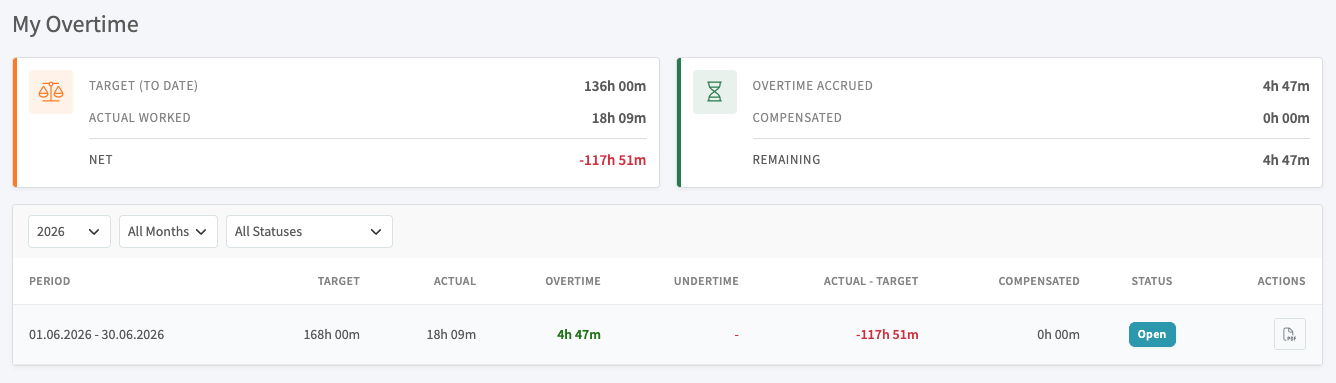
Die Übersichtskarten oben zeigen Ihr Soll bis heute, die tatsächlich gearbeiteten Stunden und Ihren Netto-Saldo sowie die aufgebauten, ausgeglichenen und verbleibenden Überstunden. Die Tabelle darunter schlüsselt dies nach Zeitraum auf und lässt Sie nach Jahr, Monat und Status filtern. Jeder Zeitraum zeigt:
- Sollminuten: die Stunden, die Sie laut Vertrag arbeiten sollten
- Istminuten: die Stunden, die Sie tatsächlich gearbeitet haben
- Überstunden / Minusstunden: die Differenz zwischen Ist und Soll
- Ausgeglichen: Überstunden, die ausgezahlt oder als Freizeit genommen wurden
- Verbleibend: Ihr aktueller Überstundensaldo
Zeitkategorien
Ihre Arbeitszeit wird nach Kategorie aufgeschlüsselt:
| Kategorie | Beschreibung |
|---|---|
| Regulär | Reguläre Arbeitszeit |
| Nacht | In Nachtschichten gearbeitete Stunden |
| Wochenende | An Wochenenden gearbeitete Stunden |
| Feiertag | An Feiertagen gearbeitete Stunden |
| Bereitschaft | Rufbereitschaftsstunden |
| Früh-/Spätschicht | Stunden außerhalb der regulären Schichtzeiten |
Überstundenstufen
Überstunden können in bis zu drei Stufen berechnet werden, jede mit unterschiedlichen Zuschlagssätzen. Zum Beispiel:
- Stufe 1: erste 10 Überstunden zu 125 %
- Stufe 2: nächste 10 Stunden zu 150 %
- Stufe 3: weitere Stunden zu 200 %
Die genauen Stufenschwellen und -sätze werden in Ihrem Vertrag oder Beschäftigungsmodell konfiguriert.
Überstundenstatus
| Status | Bedeutung |
|---|---|
| Offen | Überstunden erfasst, keine Aktion durchgeführt |
| Ausstehend | Zur Genehmigung eingereicht |
| Genehmigt | Von einem Manager bestätigt |
| Ausgeglichen | Ausgezahlt oder als Freizeit genommen |
| Verfallen | Nicht mehr ausgleichsberechtigt |
Überstunden als Manager verwalten
Manager können die Überstundenkonten aller Mitglieder unter Organisationen > Ihre Organisation > Überstundenkonten einsehen und verwalten.
Von dort aus können Sie:
- Überstundenkonten pro Mitglied und Zeitraum überprüfen
- Überstunden genehmigen
- Den Ausgleich verarbeiten (Auszahlung oder Freizeit)
- Überstundenberichte als PDF exportieren
Gleitzeitsaldo
Wenn Ihr Vertrag Gleitzeit umfasst, erfasst Ihr Überstundenkonto auch den Gleitzeitübertrag zwischen Zeiträumen. Sie können in einem Zeitraum zusätzliche Stunden aufbauen und in einem anderen nutzen.